One slider for weight, one for swashes: inside Last Christmas Variable
Most variable fonts let you slide from thin to bold. Last Christmas Variable has a second slider that brings in the swashes, from none at all to every one.
A normal font file is one fixed style: Regular is Regular, Bold is Bold. A variable font is different. It is a single file that can produce every style between its lightest and its heaviest, controlled by a slider.
Last Christmas Variable has two sliders.
Slider one: weight
The first works like most variable fonts. It runs from Thin at 100 to Black at 900. In between you are not limited to Light, Regular and Bold: any number works, so a headline can be exactly as heavy as the layout needs.
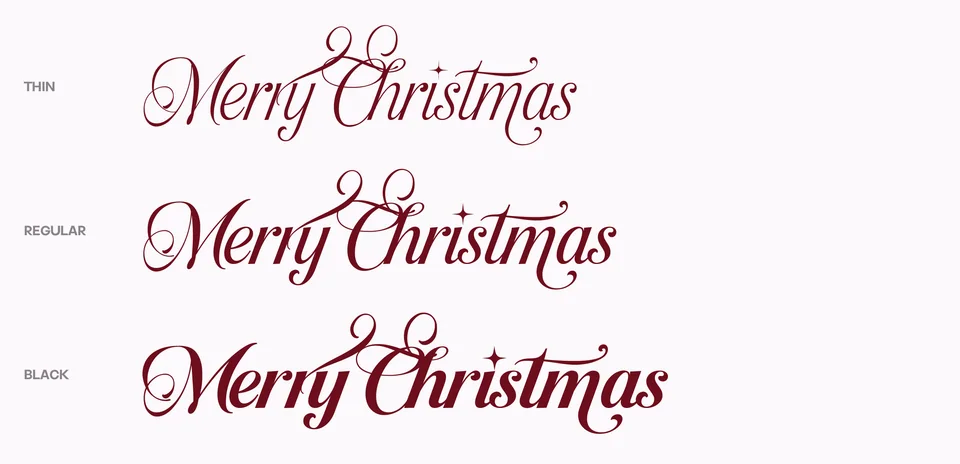
Slider two: swashes
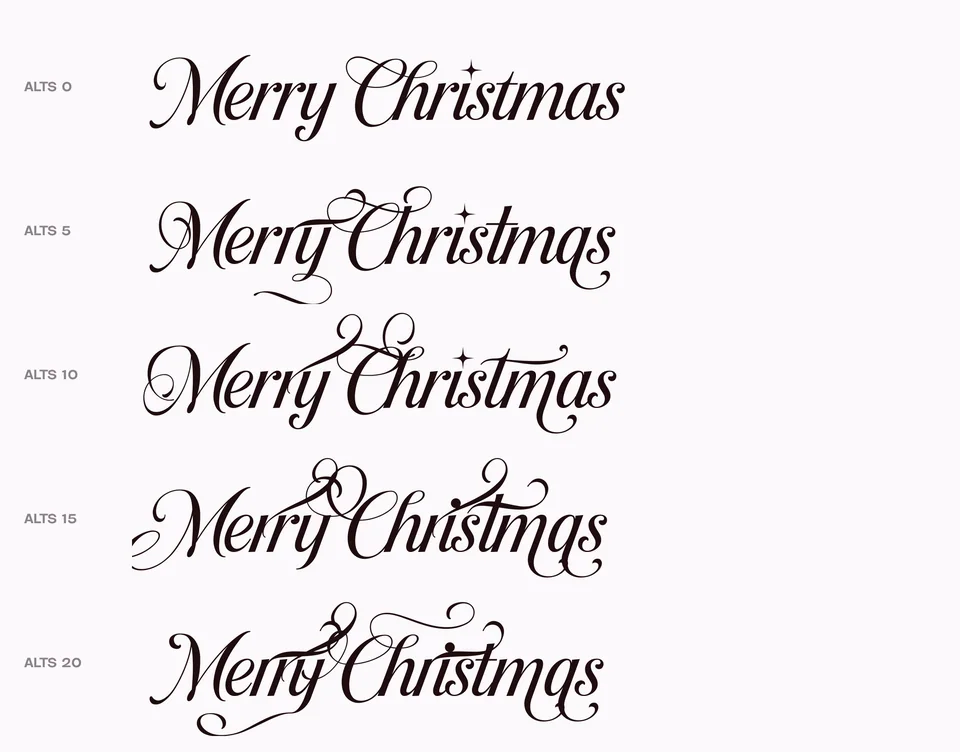
The second slider is called ALTS, and it is less common. At 0 you get the plain letters. As you move it up, more and more letters change into their swash forms, until at 20 every letter that has one is wearing it.
So instead of choosing alternates one letter at a time, you can turn the decoration up or down for a whole line at once, and stop wherever it looks right.
How a font can morph
The trick behind any variable font is that the designer draws a few versions of every letter, called masters, and the computer calculates everything in between. Last Christmas has five: Thin, Light, Regular, Bold and Black.
For that to work, every version of a letter must be built from the same points, in the same order. A thin a and a black a need exactly the same number of points, so each point can travel from its thin position to its black one. If one version has a single point more, the font cannot morph.
This is also why the AI Variable Font plugin keeps every point of the original letter when it makes new weights: with matching points, the new masters can morph into each other.
Try it on a website
On the web, both sliders are set with one line of CSS, and can even be animated:
h1 {
  font-family: "Last Christmas Variable";
  font-variation-settings: "wght" 650, "ALTS" 12;
}
 Last ChristmasFont · Script →
Questions
Where can I use the swash slider?
In web browsers it works fully, through CSS. Desktop apps differ in how they handle a second, custom slider, so test it in yours first.
Do I need the variable font if I have the normal one?
No. The normal fonts contain the same letters and alternates. The variable one adds the freedom to choose any weight, and the slider.